Scroll sideways to see the whole chart. Heavier lines mark every 10 stitches.
Floss key
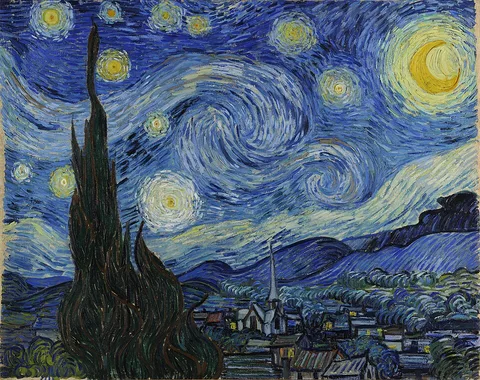
Choose a picture, set how many stitches across and how many colors you want, and the maker draws a cross stitch chart with DMC floss numbers. It also works out the fabric to cut and how many skeins of each color to buy. The sample is Van Gogh's The Starry Night: it becomes a chart of 80 × 63 stitches in 18 colors, about 5.7" wide on 14-count Aida.
How to make a cross stitch pattern from a photo
Choose a picture. A clear photo with strong light and dark areas works best.
Set the stitches across. The rows follow the shape of your picture.
Set the most colors you want. The maker picks the DMC floss that fit your picture best.
Pick your fabric. The finished size and the fabric to cut update straight away.
Check the chart and the stitched look. Change the size or colors until the detail you care about shows.
Download the PDF pattern. It has a cover page with the floss key and the chart on numbered pages.
The painting
80 stitches across, 18 colors
Each square of the chart is one cross stitch. At this size the swirls and the dark cypress tree stay clear; smaller details such as single stars turn into a few stitches.
Choosing a picture that stitches well
The chart can only keep detail the grid has room for. At 80 stitches across, each stitch covers about 6 pixels of the 480 pixel wide sample, so fine lines blur into their neighbors.
Crop close to the subject. Background takes stitches away from the part you care about.
Pick strong contrast. A face lit from one side keeps its shape better than one in flat light.
Simplify busy pictures before you start. Turning up contrast in a photo editor helps the maker pick fewer, clearer colors.
Use a plain background if you can. You can leave it unstitched, which saves the most thread of all.
How big will my cross stitch pattern be?
Finished size is stitches divided by stitches per inch. Here is the width for common pattern sizes on each fabric, from the same math as our fabric count converter. Height works the same way.
Finished width in inches for patterns 50 to 200 stitches across on 11, 14, 16 and 18 count Aida and 28 count evenweave over two
Stitches across
11-count Aida
14-count Aida
16-count Aida
18-count Aida
28-count over two
50
4.5"
3.6"
3.1"
2.8"
3.6"
80
7.3"
5.7"
5"
4.4"
5.7"
100
9.1"
7.1"
6.3"
5.6"
7.1"
150
13.6"
10.7"
9.4"
8.3"
10.7"
200
18.2"
14.3"
12.5"
11.1"
14.3"
So 80 stitches across is a 5.7" wide piece on 14-count Aida, small enough for a 7 inch hoop. At 150 stitches on 18 count it is 8.3" wide. Add the margin you need for framing on every side; the maker adds 3 inches by default.
How many colors should a cross stitch pattern have?
We ran the sample painting through the maker at 80 stitches across with four color limits. "Lone stitches" are single squares whose color matches none of their neighbors. Tidying fixes those, and the table counts how many it fixed.
The Starry Night at 80 stitches across with 10, 20, 30 and 40 color limits: colors used, lone stitches tidied and skeins to buy
Color limit
Colors used
Lone stitches tidied
Skeins to buy
10
10
210
10
20
18
246
18
30
20
254
20
40
27
259
27
Skeins climb with every color, because each floss needs at least one skein even for a handful of stitches. Past 20 colors the maker also runs short of new shades: a limit of 40 gave 27 colors, because several picture colors landed on the same DMC floss. Tidying fixed 210 to 259 lone stitches at every limit, about 5 percent of the 5,040 stitches, and each one saves a thread change. A busy painting like this looks right at 20 to 30 colors; a simple logo or cartoon often needs fewer than 10.
How the maker matches DMC floss
Comparing colors by their red, green and blue numbers gives odd matches: two colors can be close in numbers and look nothing alike. The maker converts every color to CIELAB, a color space laid out the way people see, and measures the gap with the CIEDE2000 formula. A difference under about 2 is hard to spot by eye.
Floss colors on a screen are approximate. The darkest color in the sample, DMC 310 black, shows as #000000 here, but real thread has sheen and texture a screen can't show. Hold the skeins next to each other in the shop, or check them against a DMC color card.
Reading your chart
One square on the chart is one cross stitch. Each color has its own symbol and color block, listed in the floss key. Heavier lines mark every 10 stitches so you can count quickly. The red arrows on the top and left edges point to the center lines; DMC suggests starting from the center so the design sits in the middle of the fabric. Our guide on how to cross stitch covers the stitch itself, and the floss calculator lets you re-check skeins if you change strands.
Which pictures can you turn into a pattern?
Your own photos are always fine. Old artwork is often in the public domain: in the United States, copyright usually lasts for the author's life plus 70 years, according to the U.S. Copyright Office. Van Gogh died in 1890, which is why his painting is our sample. Characters, logos and other people's photos usually need permission, especially if you plan to sell the pattern.
Video tutorial
"How to read a cross-stitch chart - Tutorial" by DMC, on YouTube. The video loads only when you press play.
Embed this calculator on your site
Free to use on a blog, guild site or class page. Paste the code into an HTML block. Please keep the credit line under the calculator.
Assumptions and sources
What the calculator assumes
Each grid square takes the average color of the picture pixels inside it. Squares that are mostly see-through are left blank.
The picture's colors are grouped into as many clusters as your color limit allows (k-means in CIELAB). Each cluster takes its closest DMC floss, and each square then takes the closest of those floss.
Color difference is CIEDE2000, a formula built to match how people see small color changes. The maker never uses more floss than you allow, and sometimes fewer when two clusters land on the same floss.
Tidying gives a lone stitch the color around it when at least three of its four neighbors share that color.
Fabric size comes from the fabric count converter: stitches divided by stitches per inch, plus the margin on every side, rounded up to a whole inch.
Skeins come from the floss calculator: 8 m six-strand skeins, your strand count and a 55 percent allowance for starts, ends and travel.
DMC screen colors are approximate. Thread looks different from a screen, so check each color against a color card or the real skein.
Yes. There is no sign-up, no watermark and no limit on how many patterns you make. The PDF download is free too.
Is my photo uploaded anywhere?
No. The picture is read and turned into a chart inside your own browser. Nothing is sent to a server, so private family photos stay on your device.
How many stitches across should my pattern be?
Work back from the size you want to frame. Multiply the finished width in inches by your fabric count: an 8 inch wide piece on 14-count Aida is 112 stitches across. For a first project, 50 to 100 stitches across keeps it to a few weeks of stitching.
How many colors should a cross stitch pattern have?
Fewer colors mean fewer thread changes. With our sample painting at 80 stitches across, going from 20 to 40 colors added 9 more skeins to buy. Start around 15 to 20 colors, look at the chart, and add colors only where detail is lost.
Why do the floss colors look different from my photo?
There are about 450 DMC colors, and a photo has thousands of shades, so each square gets the closest floss. Screens also show color differently from thread. Check the floss list against a DMC color card before you buy.
Can I sell a pattern made from someone else's photo?
Only with permission, unless the picture is in the public domain. Photos you took yourself are the safe choice. In the United States, copyright usually lasts for the author's life plus 70 years.